Available now
Ask ChatGPT how your daughter is doing. It actually knows.
IllumiTutor works inside ChatGPT and Claude. Ask the assistant you already use — in plain English, at 11pm, between meetings — and it reads your child's real marked work: the exact questions she lost marks on, the concept behind each one, the page in her own handwriting. Then it builds the practice that closes the gap and sets it as homework. You never open the app.

Included with the Standard Plan and above — connect it in about a minute.
A real session, not a mock-up
One sentence — “find Kristine's weak concepts for Science from the past month” — and ChatGPT read a month of marked work: 343 graded questions, ranked by the marks each concept actually cost her. Then it opened her answer script inside the chat, so every claim on screen could be checked against the paper it came from.
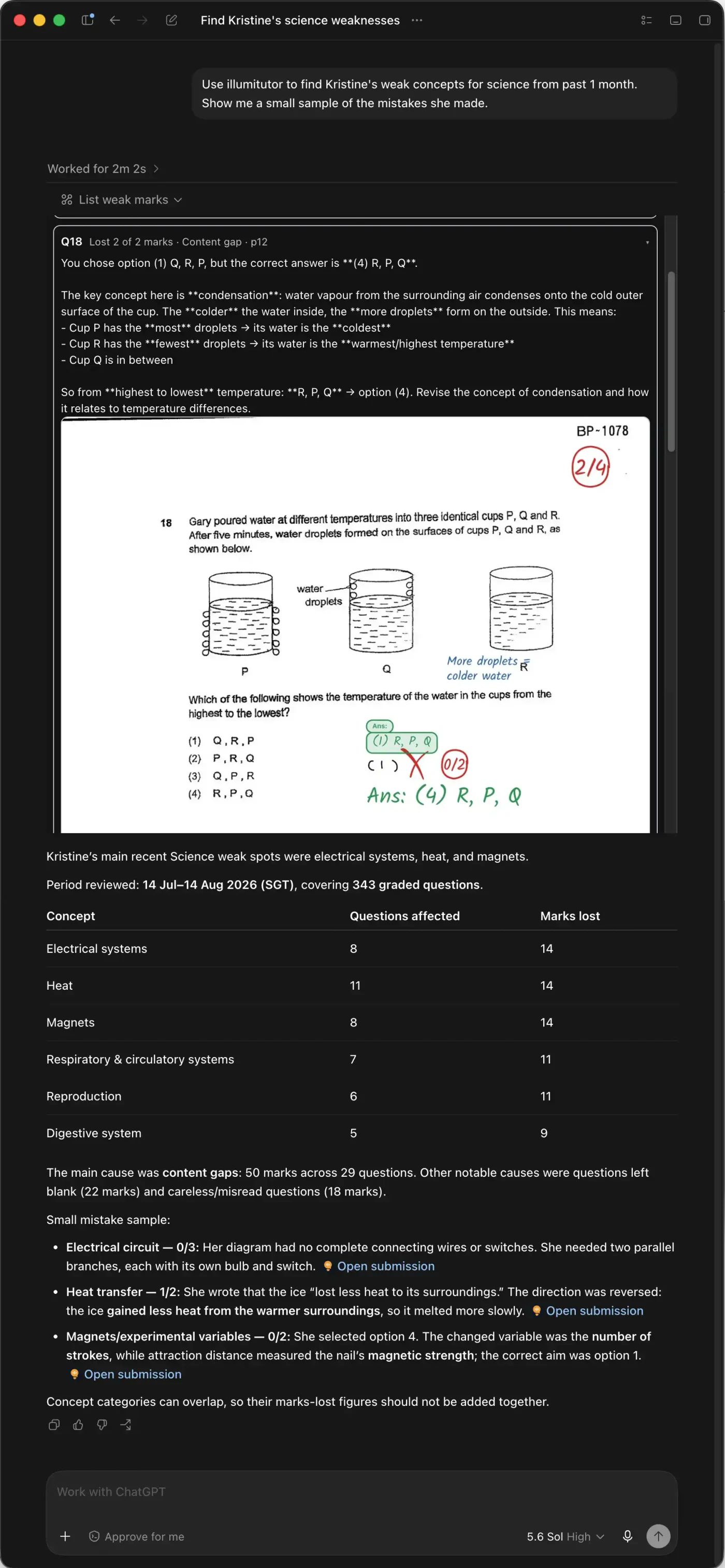
Claude answers the same question the same way — the same tools, the same marked pages, the same practice papers. Only the chrome around it looks different.
Three things worth asking at 11pm
Track
“How is Kristine doing in Science this term?”
It reads back her existing Coach Lumi report — per-subject bands, technique-vs-content splits, weak concepts and ranked priorities for what to revise next — alongside the raw marks behind it, question by question. It reads what Coach Lumi has already generated; it does not run new trend analysis on the spot.
Plan
“Build a revision plan for her Science Weighted Assessment.”
It applies IllumiTutor's WA method: schools cover the syllabus in a different order, so another school's "P5 Science WA1" paper is not preparation for hers — it's a random slice of the syllabus, not her syllabus. It works out the actual topics being tested and builds the plan from only those.
Act
“Build her ten questions on heat and set it as homework.”
It pulls real past-year questions matched to that exact gap, assembles them into a practice paper and assigns it. She gets the notification while you are still typing.
Connect it in about a minute
Copy the connector address below, then add it once in ChatGPT or Claude and sign in with the IllumiTutor account you already have. It works on every device you use that assistant on.
https://mcp.illumitutor.com/api/mcpClaude
- 1On the connectors panel (link below), choose Add ▾ → “Add custom connector”.
- 2Name it “illumiTutor”, paste the address above, and press Add.
- 3Sign in with your IllumiTutor account when Claude asks, and approve the connection.
- 4Start a new chat and ask about your child’s work — Claude will use it automatically.
ChatGPT
- 1Turn on developer mode, a one-time setting (link below).
- 2Open ChatGPT’s Plugins page (link below) and click the (+) button.
- 3In New Plugin: name it “illumiTutor”, set Connection to Server URL and paste the address above, and set Authentication to OAuth.
- 4ChatGPT will show a red warning that it hasn’t reviewed this MCP server — that’s its standard notice for any connector outside its own directory, not something specific to IllumiTutor. Tick “I understand and want to continue” and press Create.
- 5Sign in with your IllumiTutor account when ChatGPT asks.
Using the ChatGPT desktop app instead?
- 1Go to Settings → Plugins, then choose Add ▾ → “Add MCP server”.
- 2Name it “illumiTutor”, set Type to Streamable HTTP, and paste the address above as the URL.
- 3Leave “Bearer token env var” and both Headers sections blank — IllumiTutor signs you in with OAuth, not a token.
- 4Press Save, then sign in with your IllumiTutor account when ChatGPT asks.
Requires the Standard Plan (S$14.99/month) or above.
How it works
- 1
Connect it once
Add IllumiTutor as a connector in ChatGPT or Claude, then sign in with the IllumiTutor account you already have. About a minute, once, on any device you use.
- 2
Just ask
No commands to learn, no syntax to get right. Ask the way you would ask a tutor at the school gate — and follow up the same way.
- 3
Let it do the work
Reading is only half of it. It can assemble a practice paper aimed at the exact gap and set it as homework — and your child is notified the moment it does.
Why this isn't just another AI summary
You see the page, not a paragraph
The marked script renders right there in the chat — ticks, crosses, score circles and your child's own handwriting. Every claim is checkable against the paper it came from.
Every number comes from a marked paper
Nothing is estimated, inferred or vibed. It reads the same graded marks the app shows you, so the assistant cannot flatter you or invent a weakness that was never there.
Your own children, and no one else
It signs in as you and inherits your account's access exactly. Another family's work isn't merely hidden from it — as far as the assistant is concerned, it does not exist.
It fits the ten minutes you actually have
On the train, in the queue, after they have gone to bed. No app to open, no dashboard to learn, no evening set aside to work out what went wrong.
Questions parents ask
When can I use it?
Right now. Connect it in about a minute using the steps above, and it starts working the moment you sign in.
Does it cost extra credits?
No — nothing the assistant does through IllumiTutor spends a credit. Reading marks, pulling weak concepts, assembling a practice paper, setting homework: all free actions, exactly as they are in the app. What does require something is the connector itself, which needs the Standard Plan or above. Credits still work as they do today — you spend them only when work gets marked.
Do I need a particular IllumiTutor plan?
Yes. The ChatGPT and Claude connector is included with the Standard Plan and above. A free account still marks your child’s work and buys credits exactly as it does today — the connector is a Standard-Plan feature.
Do I need a paid ChatGPT or Claude plan?
You will need a plan that lets you connect third-party tools, which both ChatGPT and Claude offer on their paid tiers. Your IllumiTutor account and credits are unaffected either way.
Can the AI change my child’s marks?
No. It can read marks and set homework; it cannot alter a grade. Marking corrections stay in the app, where you make them yourself.
What exactly gets shared with ChatGPT or Claude?
Only what is needed to answer the question you asked, in your own session — the marks, feedback and page images the assistant has to read to reply. IllumiTutor sends your child’s work nowhere else, and your assistant’s own data settings apply to it just as they do to anything else you put in that chat.
Can I turn it off?
Yes. Disconnect it inside ChatGPT or Claude at any time and its access ends immediately. Your work in the app is untouched.
Get set up now — it works the moment you sign in.
Start free — 200 creditsChatGPT and OpenAI are trademarks of OpenAI. Claude is a trademark of Anthropic. IllumiTutor is not affiliated with, sponsored or endorsed by either company.